RetrievalP Get it for Windows

iPhone photo recovery for Windows

Find the photos you deleted from your iPhone.

Plug your iPhone into your PC and RetrievalP shows you every deleted photo and video it can still find. Look through all of it for free. Pay only if you want to keep it.

  • Free scan, no account
  • Photos never leave your PC
  • Scanning never changes your iPhone
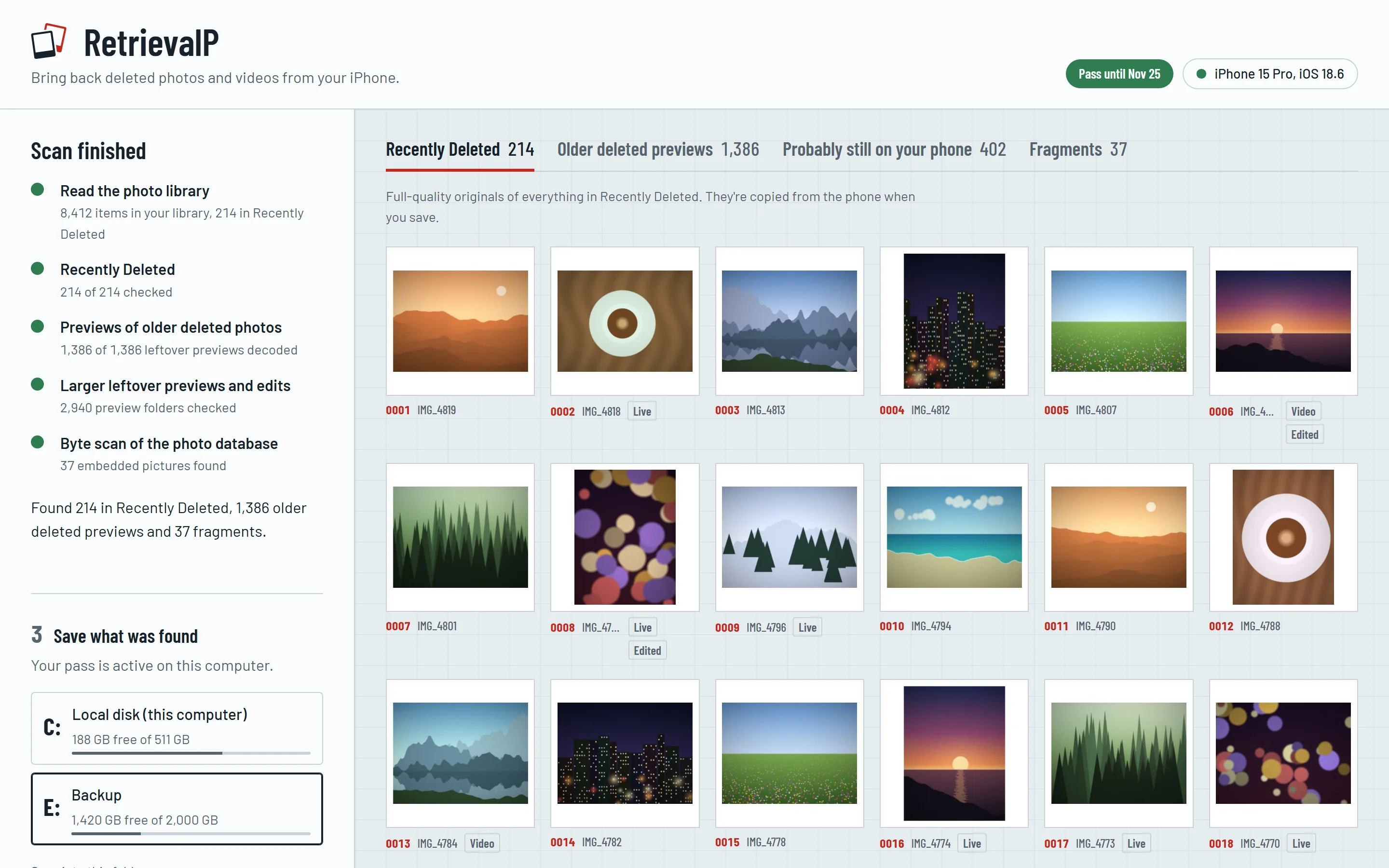
RetrievalP after a scan: 214 photos found in Recently Deleted, 1,386 older deleted previews, laid out as a grid with a panel for saving them to a drive.
4places on the phone it searches
0photos uploaded, ever
Read-onlyscan: nothing on your iPhone changes
Freeto scan and see every result

Tour

See everything before you pay for anything

One scan, every hiding place

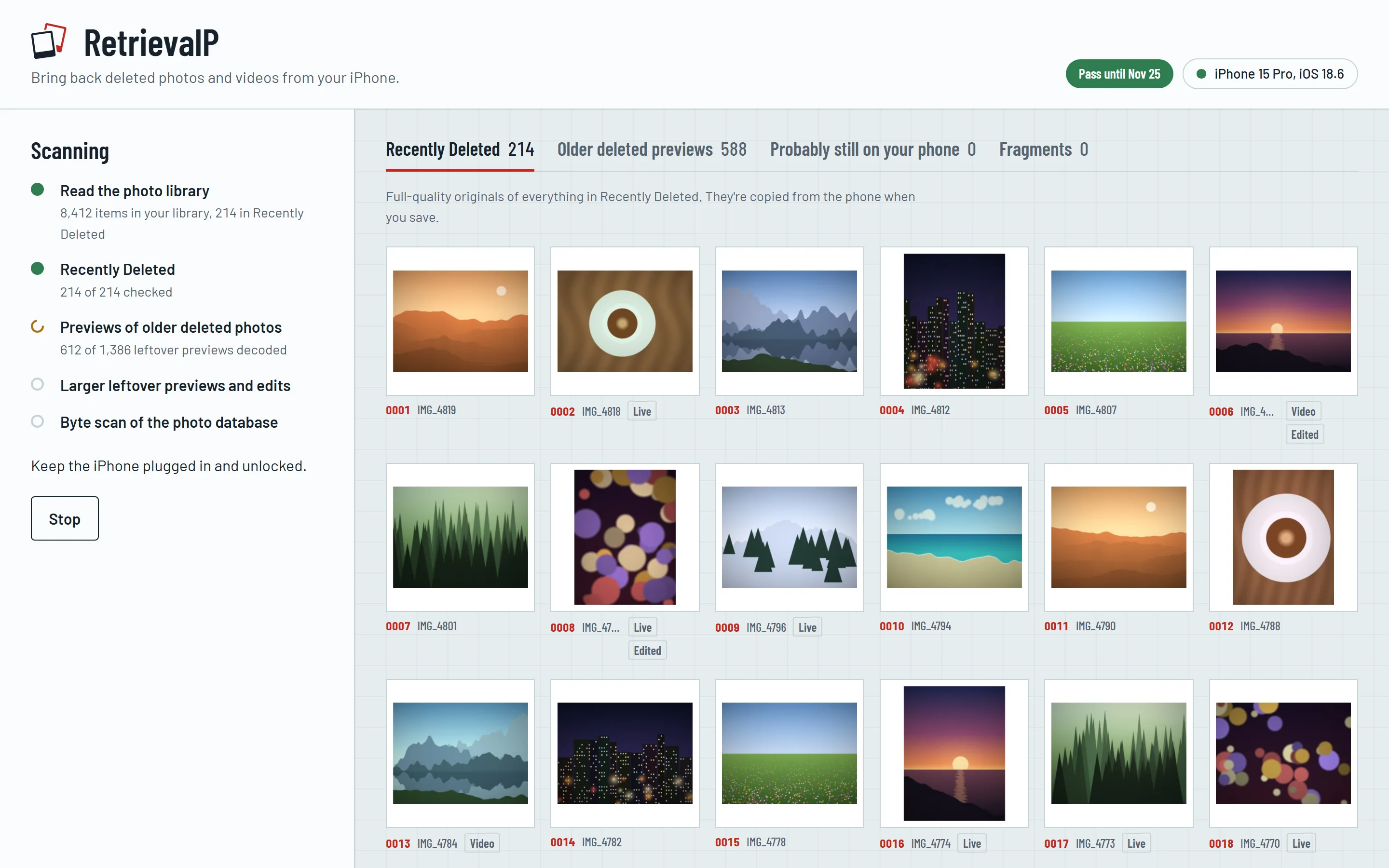
RetrievalP reads the photo library, Recently Deleted, the phone’s thumbnail cache, leftover edits and the raw database itself. You can watch each step finish, and results start appearing while it works.

  • Usually done in a few minutes
  • Keep using your PC while it scans
A scan in progress, with each step listed and photos from Recently Deleted already showing.

Even photos deleted for good

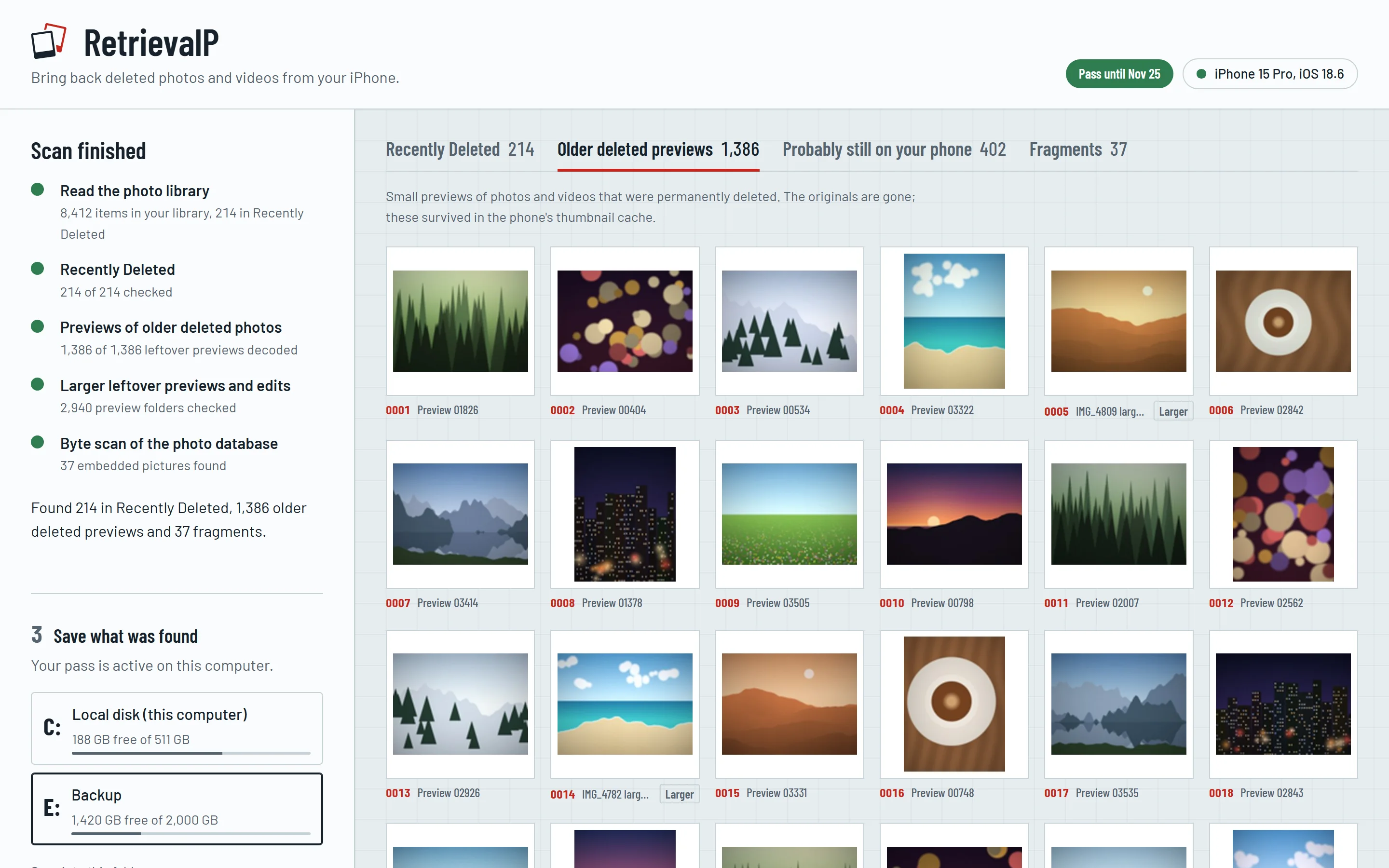
When a photo leaves Recently Deleted, the Photos app often keeps the little preview it made for its grid. RetrievalP finds those and rebuilds them, sometimes months after the photo disappeared.

  • Filters out ones still in your library
  • Picks up larger previews and edits when the phone kept them
The Older deleted previews tab, showing a grid of small rebuilt previews of permanently deleted photos.

Save it all in one go

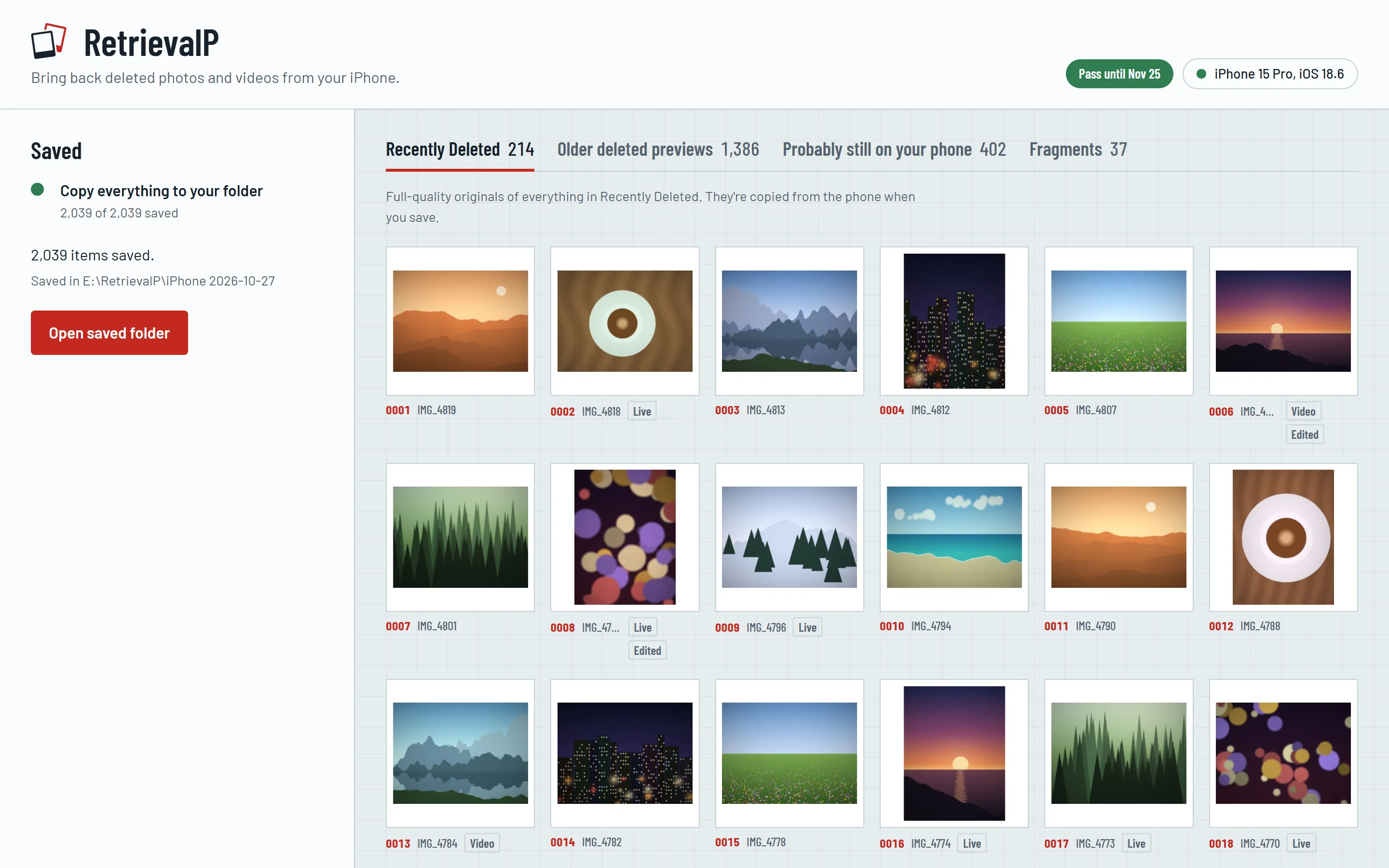
Open any result to see it large first. When you’re ready, pick your PC or an external drive and save everything, sorted into folders with a report of where each file came from.

  • Originals saved at full quality
  • Live Photo motion and edits included
Saving finished: 2,039 items saved to a folder on the Backup drive, with a button to open the folder.

Screenshots show the real app with sample pictures in place of personal photos.

What it finds

Honest about what comes back

Where RetrievalP looks on the phone, and the size of what you get from each place.

Recently Deleted

Anything deleted in the last 30 days or so. You get the original files at full quality, with Live Photo motion and edited versions.

4032 px, the full photo

Leftover previews and edits

Sometimes the phone keeps a larger preview or an edited copy of a photo after the original is deleted. When it does, you get those.

Previews up to 640 px

Thumbnail tables

The Photos app keeps tiny previews for its grid. They can outlast the photo by months, until the phone reuses their space. This is usually all that is left of older deletions.

About 120 px

Drawn to scale against a typical 12-megapixel iPhone photo, 4032 pixels wide.

What no app can bring back

A full-size original deleted more than about 30 days ago. iOS encrypts every photo with its own key and destroys that key when the photo is deleted for good, so the original can’t be rebuilt by RetrievalP or anyone else. Be wary of any tool that promises otherwise.

How it works

Three steps, about ten minutes

  1. Connect your iPhone

    Plug it into your Windows PC with a USB cable, unlock it and tap Trust when it asks. Windows needs Apple’s free iPhone driver, which comes with the Apple Devices app or iTunes.

  2. Scan for free

    RetrievalP reads the phone’s photo library and the files around it, then lays out everything it found. Scanning a phone takes a few minutes.

  3. Save what you want

    Buy a short pass to copy the results to your computer or an external drive, sorted into folders with a report of where each file came from.

Your photos stay on your computer

RetrievalP runs entirely on your PC. Your photos and phone data are never uploaded anywhere. Scanning and saving only read from your iPhone. The one thing that deletes anything is the optional clean-up add-on, and only after you confirm.

It goes online only to check your licence key with our payment provider and to look for updates. Your photos never leave your computer. No cookies, no tracking. Privacy policy

Pay only if it finds something

€9.99 one-time pass, VAT included

Scanning is free, and you see every result before you buy. To save what it finds, you buy a short pass. If the scan finds nothing you want, you pay nothing.

  • Free scan with full results
  • One-time pass, no subscription
  • 14-day refund if it doesn’t work for you
  • Optional add-on to remove leftovers from the iPhone
  • Receipts and refunds handled by Lemon Squeezy

Prices in other currencies are shown at checkout.

Questions

Good to know

What you’ll need: a Windows 10 or 11 PC (64-bit), your iPhone with its cable and passcode, Apple Devices or iTunes, and free space for what you save.

Why are my older photos so small?

When a photo leaves Recently Deleted, iOS deletes the original and the key that encrypted it. What can survive is the small preview the Photos app made for its grid. RetrievalP rebuilds those previews, but it can’t make them bigger than the phone kept them.

Do I need Apple’s software?

Yes. Windows can only talk to an iPhone through Apple’s driver, which comes free with the Apple Devices app (Microsoft Store) or iTunes (apple.com). Open it once with the iPhone connected and tap Trust on the phone. After that, RetrievalP does the rest.

Are my photos uploaded?

No. Everything happens on your computer. The app only goes online to check your licence key and to look for updates.

Will it change anything on my iPhone?

Not unless you ask it to. Scanning and saving only read from the phone. The optional clean-up add-on deletes leftovers of photos you already deleted, only after you confirm, and never touches the photos in your library.

Can it remove the leftovers from my iPhone?

Partly, with the clean-up add-on. Some leftover previews and edits are loose files, and RetrievalP can delete those for good. The rest sit inside files the Photos app is using, and deleting from those could damage your library, so RetrievalP leaves them alone. The scan tells you how many of each it found. To clear everything, back up the iPhone, then use Erase All Content and Settings and restore.

What if the scan finds nothing?

Then it cost you nothing. You only buy a pass if there is something you want to save.

Does it work on a Mac?

Not yet. RetrievalP is for Windows 10 and 11 today, and a Mac version is on the way. The scan will be free there too.

Your deleted photos might still be there.

RetrievalP is coming soon for Windows 10 and 11. The scan will be free.

Download available at launch