Recover deleted iPhone photos without a backup
The short answer: without a backup, there are two places deleted iPhone photos can still be: Recently Deleted, for about 30 days, and the iPhone's internal image cache, which often keeps a preview copy of photos deleted for good. A computer can read that cache over USB. Full-size originals deleted for good can't be recovered without a backup, by any app.
Step 1: check Recently Deleted and Hidden
Open Photos, tap Albums and scroll down to Utilities. Recently Deleted keeps photos for about 30 days, at full quality. Since iOS 16 it's locked: tap View Album and unlock with Face ID, Touch ID or your passcode. Select the photos and tap Recover. Check Hidden while you're there.
Step 2: look for copies you didn't think of as backups
- iCloud.com/photos, if iCloud Photos was ever on, including its own Recently Deleted.
- Chats you sent or received the photo in: Messages, WhatsApp, Telegram, email.
- Shared Albums and shared iCloud libraries.
- Google Photos, OneDrive, Dropbox or Amazon Photos camera upload.
- A computer you once imported photos to, an old phone, or an SD card.
Step 3: read the image cache
If the photos aren't anywhere else, the iPhone's image cache is the last place they can be. It's where iOS keeps the preview copies the Photos grid shows, and previews of deleted photos are often left behind in it, sometimes for months, until the space is reused. How the iPhone image cache works explains why.
To read it on a Windows PC:
- Install Apple's free Apple Devices app from the Microsoft Store, or iTunes. It provides the driver Windows needs to talk to an iPhone.
- Connect the iPhone with its cable, unlock it and tap Trust.
- Run RetrievalP's free preview scan. It reads the cache, sets aside every photo still in your library, and shows how many deleted photos it found, each as a mosaic, with a few at real size.
- If it found the photos you're after, a pass (€9.99, once) runs the full scan and saves them to your PC.
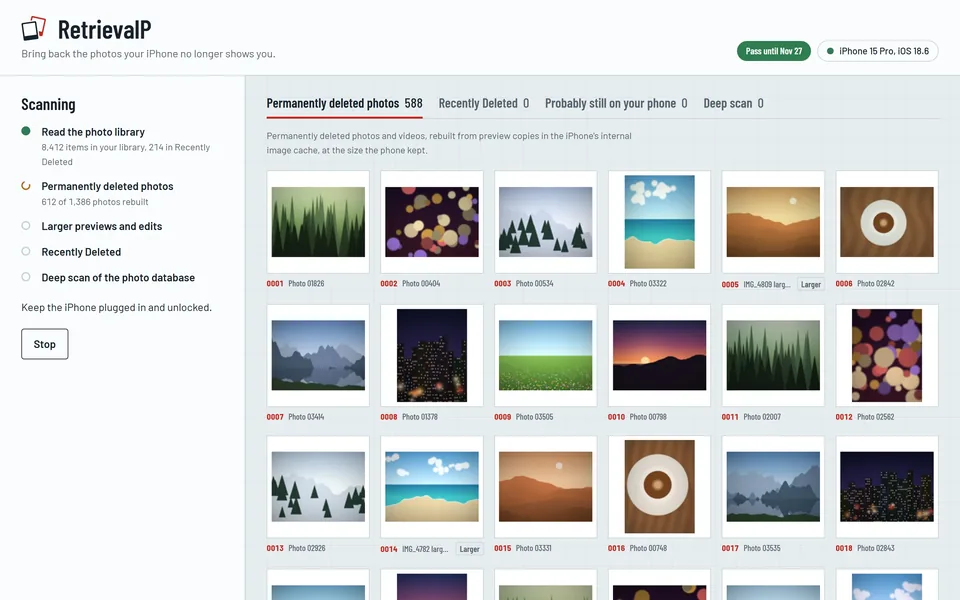
Recovered previews come back at the size you saw them in your Photos grid: right for keeping and sharing, though not for enlarging or printing.
What doesn't work
- Restarting, updating or resetting settings. None of these bring photos back, and an update can make the phone reuse cache space.
- Erasing and restoring. Without a backup that holds the photos, a restore can't bring them back, and erasing replaces the image cache.
- Tools that promise full-size originals. iOS encrypts each file with its own key and destroys the key on deletion. No app can rebuild the original after that.
- Apple Support. Apple doesn't keep copies of your photos outside iCloud Photos and can't restore them.
Keep your photos safe from now on
- Turn on iCloud Photos, or a camera upload service, so every photo has a copy off the phone.
- Back up to your computer now and then with the Apple Devices app, iTunes or Finder. A computer backup is a snapshot that a deletion on the phone can't reach.
- Check Recently Deleted before emptying it.
More guides
- How to recover photos deleted from Recently Deleted on iPhoneEmptied Recently Deleted on your iPhone? The original is gone, but a preview copy often survives in the iPhone's image cache. What to check first, and how to get them back.
- How long does Recently Deleted keep photos on iPhone?Recently Deleted keeps iPhone photos for about 30 days. How to find the album, recover photos from it, and what's left after it's emptied.
- Recover deleted iPhone photos on a Windows PCGet deleted iPhone photos back on Windows 10 or 11: what you need, how to connect the iPhone, and how to scan it for photos deleted for good.
- The iPhone image cache: where deleted photos still hideHow the iPhone's internal image cache (.ithmb) keeps preview copies of photos after they're deleted for good, and how a computer reads them back.