How to recover photos deleted from Recently Deleted
The short answer: once a photo is removed from Recently Deleted, the Photos app can't show it again and Apple offers no undo. The full-size original is gone, because iOS destroys the key that unlocks it. But your iPhone often still holds a preview copy of the photo in its internal image cache, and that copy can be read over USB and rebuilt. If you have a backup from before the deletion, that's the place to start.
First, make sure the photos really are gone
Before anything else, rule out the places a "deleted" photo often turns out to be:
- Recently Deleted. In Photos, find Utilities (under Albums or Collections, or further down the main view, depending on your iOS version). Photos stay there for about 30 days. Since iOS 16 the album is locked with Face ID, Touch ID or your passcode, so tap View Album and unlock it.
- Hidden. The Hidden album sits next to Recently Deleted and is locked the same way. Hidden photos don't appear in your library.
- iCloud.com. If iCloud Photos is on, sign in at icloud.com/photos on a computer and check its Recently Deleted too.
- Other copies. Messages and WhatsApp chats you sent the photo in, Shared Albums, Google Photos, OneDrive or Dropbox camera upload, an old phone, or a computer you once imported to.
If you find them in any of these, you're done. If not, read on.
Option 1: restore a backup from before the deletion
A backup made while the photos were still on the phone holds them at full quality. There are two kinds:
- iCloud backup. Check its date in Settings, [your name], iCloud, iCloud Backup. Restoring means erasing the iPhone and setting it up again from that backup, so everything added since is lost unless you save it first. Note that when iCloud Photos is on, photos aren't part of the iCloud backup at all, because they live in iCloud Photos instead, and a deletion there is synced everywhere.
- Computer backup. If you back up with the Apple Devices app or iTunes on Windows, or Finder on a Mac, check the backup's date there. Restoring it replaces what's on the phone in the same way.
If the newest backup is older than the photos, or there's no backup, a restore won't help, and it can make things worse: setting the phone up again replaces its image cache too.
Option 2: read the iPhone's image cache
Every photo in your library gets a preview copy in the iPhone's internal image cache, the store the Photos app draws your grid from. That's why the grid scrolls instantly: it shows these previews, not the originals. When a photo is deleted for good, its preview is often left behind until iOS needs the space for something else. The Photos app no longer lists it, and no setting on the phone lets you browse the cache.
A computer can read that cache over USB. The previews are stored in Apple's own compressed image format, so they need decoding before they look like photos again. That's what RetrievalP does on Windows: it reads the cache, sets aside every photo still in your library, and rebuilds the ones that are gone. How the image cache works explains this in more detail.
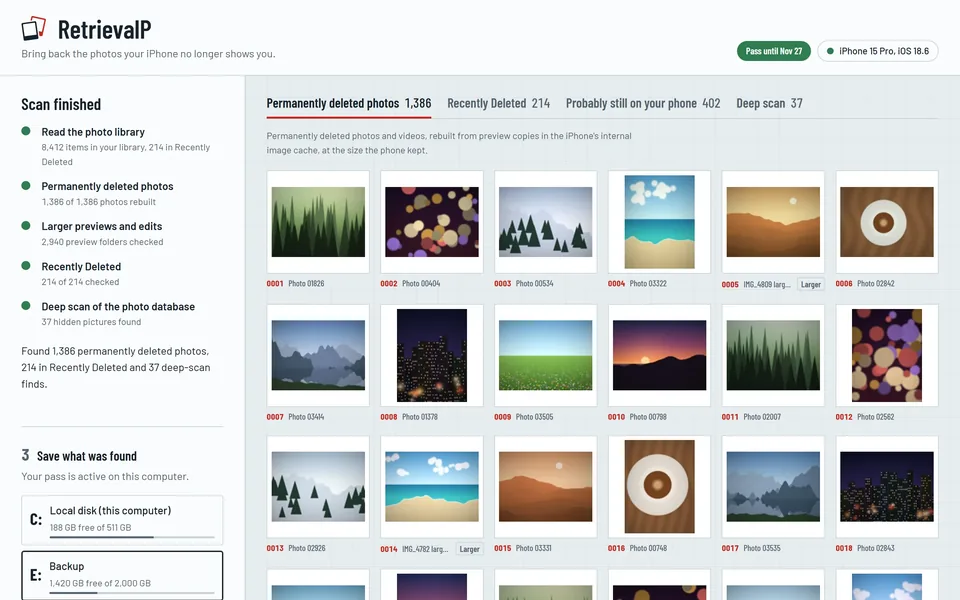
What you get back is preview size, as in your Photos grid: clear at the size you saw them in Photos and right for keeping and sharing, though not for enlarging or printing. For some photos the phone also kept a larger preview or the finished version of an edit, and those come back larger.
What no app can do
No app can bring back the full-size original of a photo deleted for good. iOS encrypts every file with its own key and destroys that key when the file is deleted, so the original's data is unreadable even if it's still on the storage chip. Be wary of any tool that promises originals after Recently Deleted has been emptied: what it can really offer is the cached copy, or the contents of a backup.
What to do right now
- Use the phone as little as possible. Taking new photos, installing apps and updating iOS all give the system reasons to reuse the space the cached previews sit in.
- Don't erase or restore the phone yet. Both replace the image cache. Check what's in the cache first, then restore a backup if you need to.
- Don't turn iCloud Photos on or off to "make them come back". It doesn't, and it can make the phone rebuild its cache.
More guides
- How to recover deleted iPhone photos without a backupNo iCloud or computer backup? Where deleted iPhone photos can still be, step by step, and what no app can bring back.
- How long does Recently Deleted keep photos on iPhone?Recently Deleted keeps iPhone photos for about 30 days. How to find the album, recover photos from it, and what's left after it's emptied.
- Recover deleted iPhone photos on a Windows PCGet deleted iPhone photos back on Windows 10 or 11: what you need, how to connect the iPhone, and how to scan it for photos deleted for good.
- The iPhone image cache: where deleted photos still hideHow the iPhone's internal image cache (.ithmb) keeps preview copies of photos after they're deleted for good, and how a computer reads them back.